A Chrome extension for prompts you see
Grab the prompt off the screen.
Pause the video, drag a box over the prompt, and get it back as clean text, saved with where you found it. Drag over an image instead and get a prompt to recreate its look in MidJourney, DALL·E or Stable Diffusion.
Free: 10 AI captures a month. No card, no account.
Prompts hide in paused videos, posts, slides, screenshots and images. Retyping them by hand is where the typos come from.
What it does
One drag. Two kinds of prompt.
Pick Text or Image prompt before you drag. Either way the result is saved to your prompt library on its own.
01 Text
Words on screen, back as text.
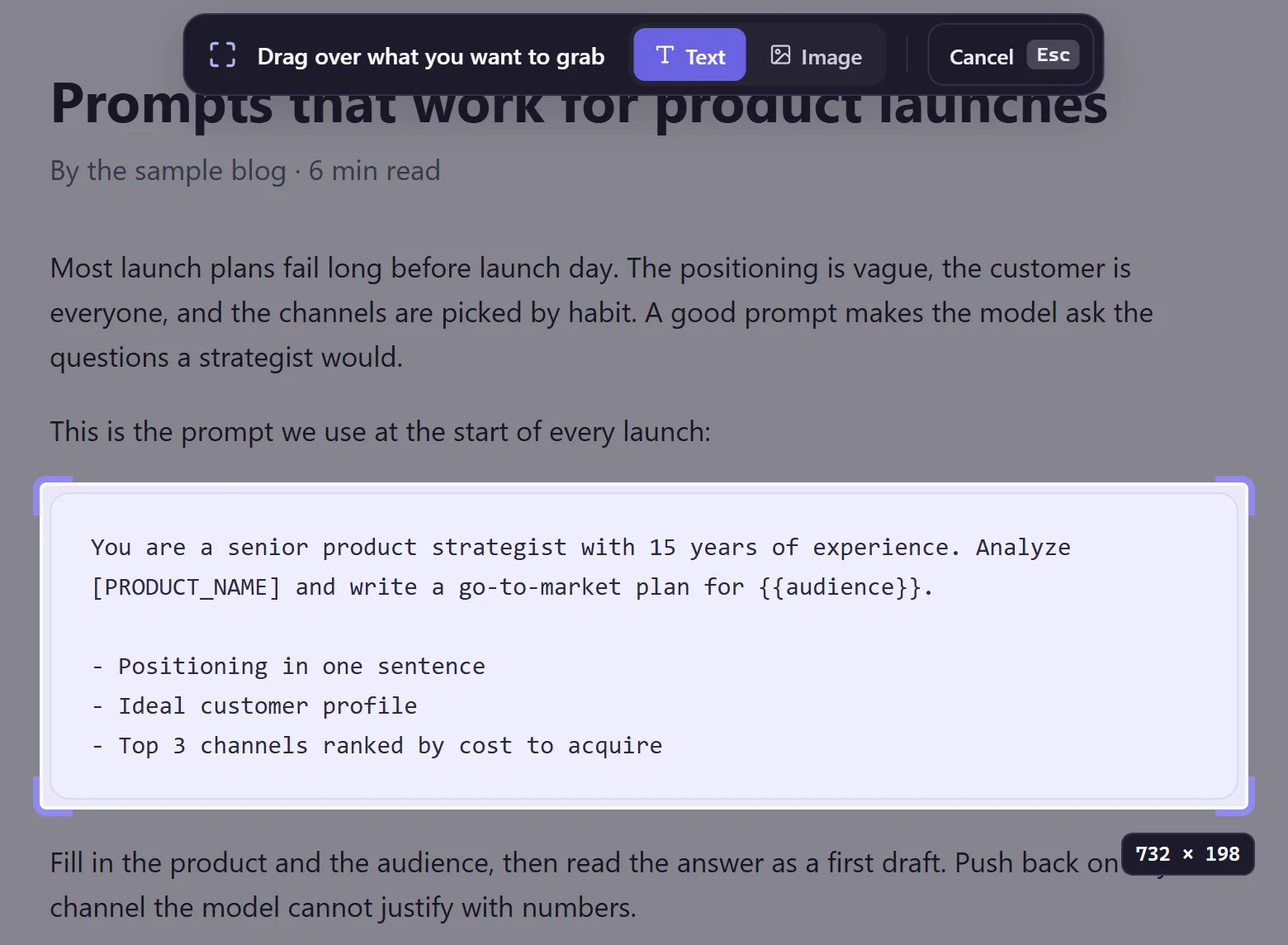
Drag over a prompt in a paused video, a post, a slide or a screenshot. The AI reads it and gives you the text as shown, with its bullets, headings and code.
- On YouTube it keeps the video, the channel and the time, with a link back to that moment.
- On posts from X, Reddit and LinkedIn, the AI is told to leave out the usernames, likes and timestamps.
- Prompt cut off? Alt X adds the next part, up to 6 parts.

02 Image prompt
Any image, turned into a prompt.
Drag over an image, or right-click it and choose Capture an area. The AI describes its style, medium, lighting, composition and colors as a prompt for the tool you pick.
- For MidJourney, DALL·E or Stable Diffusion, or UI code for a screenshot of an interface.
- Write another: the same image, written again for another tool.
- It describes the look, and the AI is told not to name artists, brands or real people.

How it works
From screen to saved in three steps.
Press Alt Z
Or click Start capturing in the popup. Choose Text or Image prompt there.
Drag a box
Over the prompt or the image. Esc cancels.
It is in your library
With the page it came from. The sidebar opens beside it: edit, fill in blanks, copy, or copy and open ChatGPT, Claude, Gemini, Perplexity or MidJourney.
Use it again
Then paste it where you type.
Every capture lands in your prompt library, with its source. Getting it back takes a shortcut, not a search through old screenshots.

[PRODUCT_NAME], and insert.
No surprises
Plain about your data and your money.
Your prompts stay in your browser
The library, its images and your settings live in Chrome on your computer. For an AI capture, the area you picked goes to Google Gemini through our service, and Prompt Grabber does not store it.
No ads, no tracking
No ads, no analytics, no selling of data in the extension. The pages you are reading load no third-party scripts and set no cookies; sign-in and checkout use Clerk and Paddle.
Exact limits, a reminder, refunds
Free is 10 captures a month, Pro is 500. The trial shows the amount and the date before you start, we email you before the charge, and any charge can be refunded within 14 days.
Plans
Free to start. Pro when you need more.
Free
$0
- 10 AI captures a month
- Up to 50 saved prompts
- Library, search, Alt P and fill-in blanks
- No card, no account
Pro 7-day free trial
$39 a year
or $4.99 a month
- 500 AI captures a month
- No limit on saved prompts
- Everything in Free
- Cancel any time in Settings
Questions
Before you install
Is Prompt Grabber free?
Yes. Free gives you 10 AI captures a month and up to 50 saved prompts, with no card and no account. Saving text you selected (Alt C) does not count as a capture. Pro is $4.99 a month or $39 a year for 500 captures a month and no limit on saved prompts.
What is stored, and where?
Your prompts, their images, your collections and your settings stay in Chrome on your computer. Our service keeps what it needs to run your plan: an install id, your account email if you sign in, your plan and how many captures you used this month. The Privacy Policy lists every field.
Which AI reads my captures?
Google Gemini, through the Prompt Grabber service. For each AI capture, the area you selected is sent as an image to the service and on to Gemini for the answer. It is not stored by Prompt Grabber. You never need an AI key of your own.
Does it work on every site?
It works on ordinary web pages in Google Chrome on a computer. It cannot capture Chrome's own pages (chrome:// pages and the Chrome Web Store), and it does not run on phones.
Is the result always right?
No. AI can misread a word or miss a line, and the sidebar labels what the AI wrote. Check a prompt before you use it, and fix it in place with Edit.
Do I need an account?
Not for Free. The 7-day Pro trial and Pro need a sign-in on this site (Google or an email link), so your plan follows you to another computer.
How do I cancel, and can I get a refund?
Cancel any time in Settings (Cancel trial during the trial, Manage billing after it) or from the link in the reminder email. Any charge can be refunded in full if you ask within 14 days of it: see the refund policy.
Next time a prompt flashes by, grab it.
Prompt Grabber is an extension for Google Chrome on a computer.